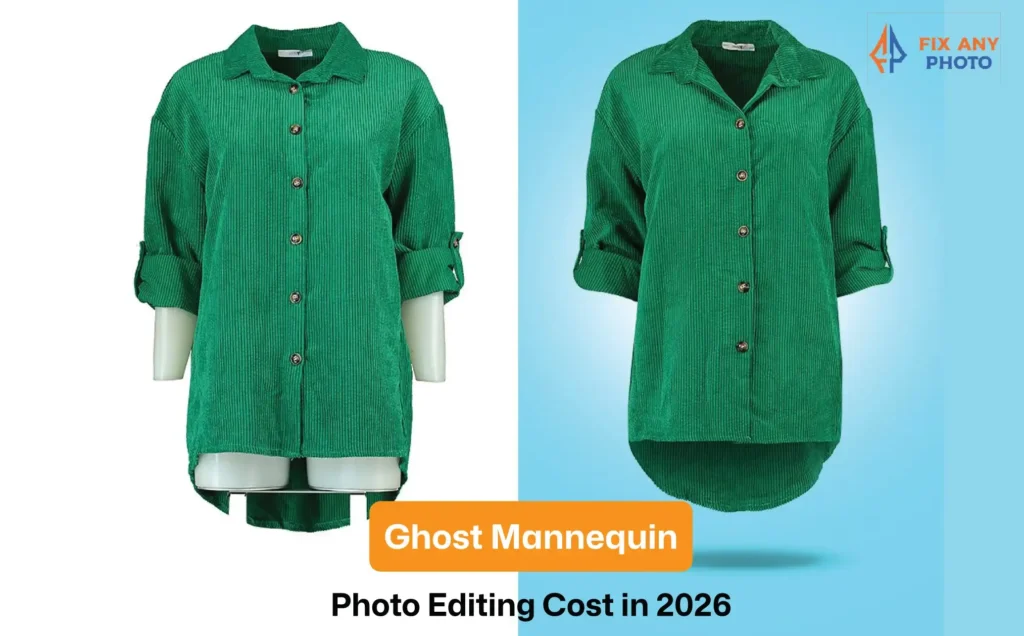
Ghost mannequin photos can make apparel look premium fast, but in 2026, the real question is cost: freelancer or tech-enabled platform? The price isn’t just a “per-image” number. It changes with garment complexity, batch size, inside-neck shots, consistency requirements, turnaround time, and revisions.
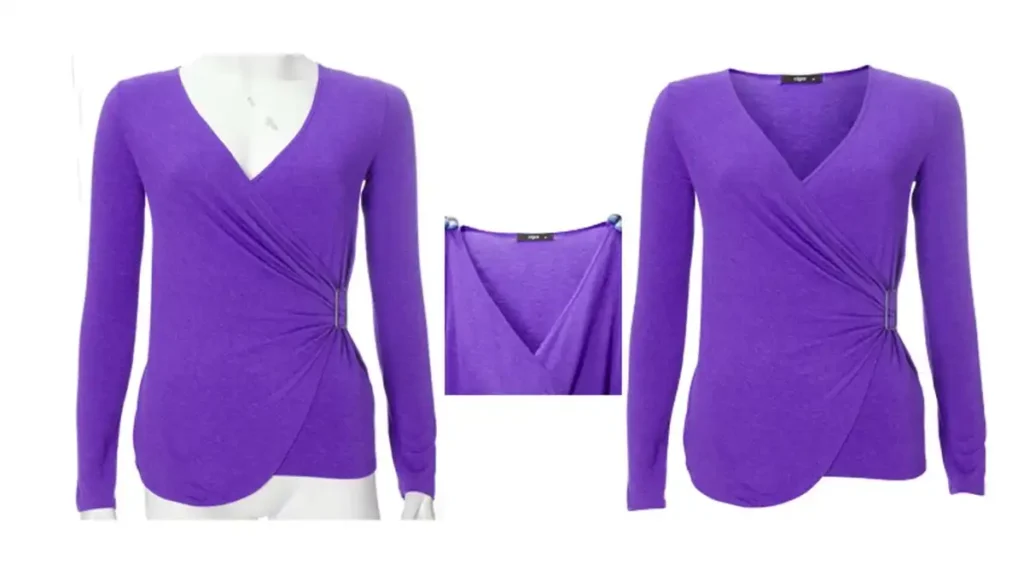
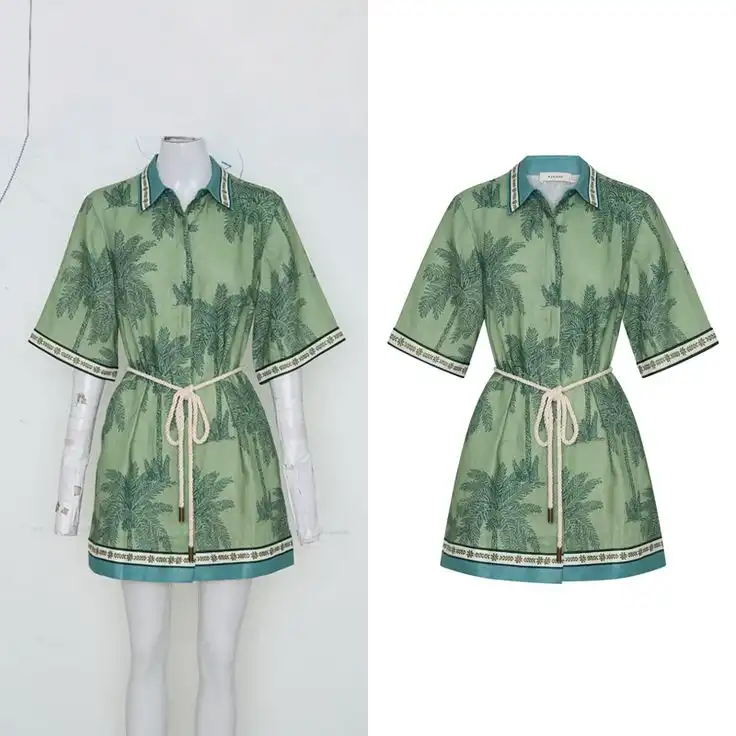
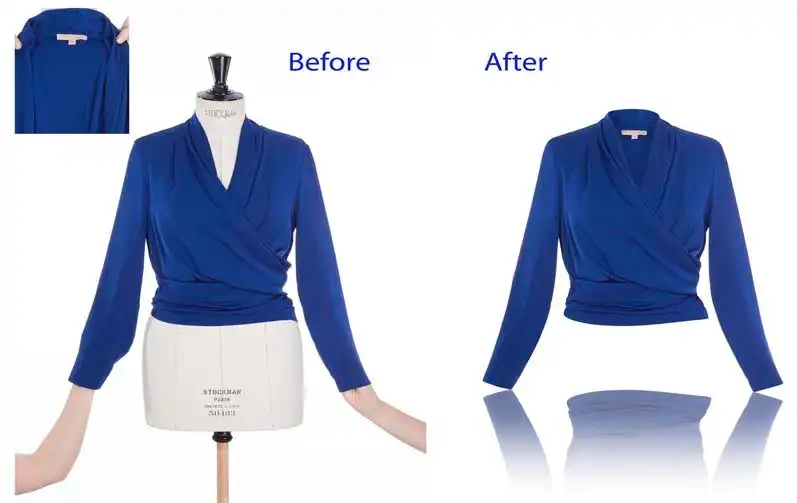
If you’re new to this style of editing or want to understand what actually goes into professional results, it helps to first see how the ghost mannequin effect works in real projects, from raw clothing photos to clean, store-ready visuals.
This guide breaks down what freelancers really charge, how platforms price their packages, what’s included vs add-ons, and how to pick the option that matches your Shopify quality goals and budget—without overpaying.
What “Real Cost” Actually Means
The “per photo” price is only part of the budget. Real cost includes four things:
- Editing cost: Removing the mannequin, building neck/sleeve joints, and cleaning shapes, shadows, and color. Basic edits often run $1.50–$3.00/image, while complex garments (lace, layers, heavy wrinkles) can hit $6–$10+. Ultra-low rates like $0.39–$0.89 usually cover only a basic joint with limited extras.
- Production overhead: Steaming, pinning, inserts for neck/sleeve shots, and keeping angles consistent—more complexity means more time and cost.
- Management cost: Writing briefs, reviewing batches, handling revisions, and exporting/renaming files—real labor that adds up fast.
- Risk cost: Cheap vendors can mean rework, delays, inconsistent results, missed launches, or reshoots—often far more expensive than the “savings.”
Putting these costs together reveals why a cheap per‑image rate is rarely the full story. Wise brands look beyond the price tag and focus on total cost and outcome.
Ghost-Mannequin Pricing in 2026: Real Rates, Real Ranges (No Hype)
Prices vary widely, but most services fall into three broad bands. The table below outlines what each tier typically includes along with realistic ranges based on 2026 market data:
| Pricing tier | Typical work included | Price range (per image)* |
|---|---|---|
| Budget edits | Single neck joint, basic cleanup, minimal color correction. Good for simple tees or quick samples. | $0.39–$1.50 |
| Standard e‑commerce ready | Neck joint plus shape refinement, consistent shadow creation and color alignment. Suitable for most e‑commerce product pages. | $1.50–$5.00 |
| Premium catalog | Complex garments requiring multiple joins (neck, sleeve, bottom), multi‑angle composites and strict brand consistency. Includes advanced masking, texture care and tight quality control. | $5.00–$10.00+ |
*Prices are estimates for 2026 and will vary based on volume, complexity and service level. Many vendors offer bulk tiers or subscription plans that lower the average cost for large catalogs.
Quick Reality Check: Why “$0.49” and “$9.99” Can Both be True
How can two vendors charge ten times different rates for “ghost‑mannequin editing”? Because the price depends on what you’re buying. Costs swing based on:
- Garment complexity – A simple cotton tee requires one neck join and minor shadow work, while a hoodie with a lined hood or a lace dress may need multiple joins, texture masking and delicate color correction. Complexity raises cost.
- Number of joins – Does the garment have a neck, sleeves, bottom hem or inside label that needs to be visible? Each join adds shooting time and post‑production steps.
- Required output set – Are you delivering a single front view or a front, back and detail shot for each SKU? More angles require more edits.
- Shadow standard – Some brands accept flat images with no shadow. Others demand natural shadows or constructed drop shadows to match their website aesthetic. Crafting realistic shadows takes time.
- Color matching rules – Many brands supply swatches or require matching to a model set. Tight color management ensures accuracy but increases editing complexity.
These variables explain why you’ll see services starting at under a dollar per image and others charging nearly ten dollars. Always ask vendors exactly what’s included and what counts as a paid “add‑on.”
Freelancer vs Platform – What You’re Really Buying
The Freelancer Route (best when you need craft + flexibility)
Where Freelancers Win:
- High‑touch detail work – Seasoned retouchers often have an eye for subtle shape cleanup and can develop a custom shadow or white balance style just for your brand.
- Custom look development – Need asymmetrical cropping, stylized shadows or a “lived‑in” look? A freelancer can experiment and iterate until it matches your creative vision.
- Direct communication – You speak directly to the person editing your files. Feedback is immediate and relationships build trust.
Where Freelancers Get Expensive fast:
- Batch inconsistency when workload spikes – A single person may struggle to maintain the same look across hundreds of images, and quality may dip when they’re overloaded.
- Slower turnaround for large catalogs – One editor can only move so fast. When you need hundreds of SKUs processed per week, you may have to wait or hire additional freelancers.
- Extra time spent briefing and managing – Customization means more back‑and‑forth. Writing detailed briefs, giving feedback and chasing revisions takes time that translates into labor cost.
The Platform Route (best when you need speed + repeatability)
Where platforms win:
- Built‑in quality control – Platforms often employ teams with multi‑step QC processes. For example, some services use hybrid manual and AI editing with three layers of quality review. This standardizes output and reduces the risk of glaring mistakes.
- Standardized outputs and faster scale – Need 800 images by next week? Platforms are built for bulk. They integrate dashboards, upload portals and consistent naming conventions so you can process large batches quickly.
- Dashboards and collaboration – Many vendors offer online portals with status tracking, team review tools and API integrations for automated workflows.
Where Platforms Quietly Add Cost:
- Rush tiers, minimums and subscription/credit plans – Want next‑day delivery? Expect a rush fee. Need only ten photos? You may have to meet a minimum order or buy credits that expire.
- “Complex garment” surcharges – If your item has lace, reflective fabric or multiple joins, a platform may classify it as “complex” and apply a higher tier.
- Revision limits – Some platforms charge for revisions beyond an initial round. Clarifying the revision policy upfront avoids surprise invoices.
Cost Models Explained (so you can compare quotes properly)
Per‑image pricing (the most common – and most misleading)
Paying a flat fee per image seems straightforward until you realize there are multiple definitions of “image.” Does it mean one photograph or one garment? Does it include a front and back view? How many output files (white background, transparent PNG, shadow version) are included? Clarify these points before signing a contract.
Per‑image pricing works best when you have a predictable pipeline of similar images. However, it can be misleading if your garments vary widely in complexity or if you require multiple angles and outputs. A “$0.89 per image” quote may only cover the front view with one neck join; additional views or shadow versions can double or triple the rate.
Hourly (great for art‑direction, risky for bulk production)
Paying by the hour can be a smart choice when you’re developing a brand style or working on edge‑case garments where the time per image is unpredictable. It allows for experimentation and close collaboration. However, hourly billing can quickly become expensive for large catalogs. Without a clear scope, costs skyrocket and budgeting becomes difficult.
Retainers & bulk tiers (the hidden sweet spot for serious stores)
Many vendors offer weekly or monthly retainers that include a fixed number of images at a discounted per‑image rate. This arrangement suits stores with regular drops because it provides predictable monthly spend and fewer surprise invoices.
Bulk tiers also reward you for sending large batches, services may drop from $3 per image to under $1 when you commit to hundreds of images per month.
Comparison Table – Freelancer vs Platform (no fluff, just decision clarity)
| Factor | Freelancer | Platform/Studio Platform |
|---|---|---|
| Best for | Hero images, tricky garments, custom look | Bulk catalogs, speed, repeatability |
| Consistency | Depends on the individual or small team | Typically higher thanks to QC systems |
| Turnaround | Great for small batches | Great for high volume |
| Communication | Direct and flexible when the freelancer is available | Workflow‑based (ticketing, dashboards) |
| Cost predictability | Medium (rate may vary per garment or complexity) | High (but watch add‑ons like rush fees and surcharges) |
| Revision handling | Flexible if the relationship is strong | Policy‑driven; revisions may incur extra cost |
| Scaling | Harder without a team | Built to scale up quickly |
| Risk | Key‑person risk if your freelancer is unavailable | Vendor process risk (e.g., being a small client among many) |
Following this table, here’s a quick guide:
- Choose a freelancer if you have under 100 images per month, complex garments that need art direction or a unique brand style that demands craft.
- Choose a platform if you publish 100–1,000 images per month, need fast turnaround, and value consistency more than custom nuance.
- Hybrid approaches (a freelance art director supported by a platform for bulk work) are also possible.
Price Map by Complexity (the section that earns backlinks)
Build a “complexity ladder” readers can self‑score
- Level 1 (Simple) – Tees, basic shirts, simple dresses. One neck join, minimal texture, standard fabrics.
- Level 2 (Moderate) – Hoodies, jackets, layered collars. Multiple joins and shape refinement; some tricky textures or shadows.
- Level 3 (Complex) – Lace, sheer, fur, reflective or leather pieces with heavy wrinkles. Advanced masking and multiple angle composites.
Pricing matrix
| Complexity level | Typical work included | Risk of revisions | Best buying method | Example cost range* |
|---|---|---|---|---|
| Level 1 | Neck join, basic cleanup, light shadow | Low | Per‑image or bulk tier | $0.50–$3.00 |
| Level 2 | Multiple joins, shape refinement, consistent shadow | Medium | Bulk tier or platform | $3.00–$6.00 |
| Level 3 | Advanced masking, texture care, strict QC | High | Senior freelancer or premium platform | $6.00–$10.00+ |
*Ranges are approximate and depend on volume, service and garment specifics.
The Nine Cost Drivers That Change Your Quote Overnight
When you send a vendor your sample images, they quietly score them on a few factors. Here are nine drivers that can swing the cost:
- Garment complexity score – Simple tees are low; structured jackets, coats or multi‑layer dresses are high.
- Join count – Does the item require joins at the neck, sleeves, bottom and inside label? Each join adds time.
- Fabric behavior – Sheer, furry, reflective or wrinkly fabrics are harder to mask and color correct.
- Photo quality from the shoot – Underexposed or wrinkled garments demand extensive retouching. Well‑lit photos with consistent camera height lower the editing workload.
- Output requirements – Marketplace specs often require multiple aspect ratios, sizes and file formats. More outputs mean more processing.
- Shadow standards – Natural shadows require careful construction; some brands want no shadow; others demand a soft drop shadow for every item.
- Color rules – Matching to a swatch, previous drops or a model set ensures consistency but takes time.
- Revision policy – Unclear style guides or unlimited revision requests can inflate costs. Ask what counts as a revision and how many are included.
- Turnaround time – Same‑day or next‑day delivery commands premium pricing. Standard 3‑ to 5‑day turnaround is cheaper.
Understanding these factors helps you explain your requirements clearly and negotiate a fair price.
The “True Total Cost” Framework (steal this to budget like a pro)
A simple formula your readers will remember
True Total Cost = Editing + Management + Rework + Delay Risk + Reshoot Risk.
Break down your budget using this formula. Editing covers the rate per image. Management includes prep, file naming, communication and approvals. Rework accounts for revisions or fixes due to unclear direction.
Delay risk is the potential cost of missing a marketing window. Reshoot risk covers time and money lost if your images aren’t shot correctly (e.g., missing an inside neck shot). If you budget only for editing, you’re ignoring the real drivers of profitability.
The five hidden costs most brands forget to budget
- File prep – Renaming, cropping and exporting images to marketplace specs isn’t glamorous but takes hours each week.
- Communication loops – Providing feedback, marking up proofs and clarifying instructions can equal or exceed editing time.
- Revisions caused by unclear style guides – Without detailed examples, you may reject multiple batches before achieving the desired look.
- Color mismatches across drops – Inconsistent color across shipments hurts your brand and may lead to returns. Re‑editing to match previous drops is expensive.
- Missed launch windows – Delays can mean missing a seasonal launch or marketing campaign. The opportunity cost dwarfs a few cents per image.
Platform pricing decoded (so readers stop comparing apples to rockets)
The add‑ons that change your final invoice
When comparing platform quotes, pay attention to the fine print. Common add‑ons include:
- Extra outputs – Want both a transparent PNG and a shadowed JPG? That may count as two edits.
- Complex garment tag – If a garment is classified as complex due to lace, fur or reflective fabric, a higher tier applies.
- Color matching to swatch/reference – Matching to a color swatch or previous drop adds time and cost.
- Rush turnaround – Next‑day or same‑day delivery commands a premium.
- Clipping/cleanup beyond mannequin removal – Removing loose threads, smoothing wrinkles or retouching product labels is often billed separately.
What to ask platforms before sending 500 images
- “What exactly counts as ghost‑mannequin here?” – Clarify whether neck, sleeve and bottom joins are included.
- “Is the neck joint included or separate?” – Don’t assume; some platforms charge extra for neck composites.
- “How do you handle inconsistent lighting between products?” – Ask about color normalization and shadow matching.
- “What is the revision policy and typical turnaround?” – Understand how many rounds of revisions are included and how long each batch will take.
Freelancer pricing decoded (so you don’t hire blind)
The seven freelancer red flags that cost more than money
- No consistent portfolio of ghost‑mannequin work – If a freelancer can’t show examples of similar projects, move on.
- No workflow for bulk batches – One person might do fine for ten images but falter at one hundred.
- No naming/export standards – You’ll waste time renaming files to your SKU system.
- Vague revision rules – Without clear boundaries, revisions can spiral.
- Doesn’t ask for reference shots or style guide – Great freelancers start with questions. If they don’t, expect mismatch.
- Can’t match shadow style across products – Inconsistent shadows hurt conversion.
- No sample test batch offer – A professional will gladly process a small batch so you can gauge quality and communication.
The “Test Batch” Method That Saves Brands
Before committing to a vendor, send a test batch of around 10 images spread across three complexity levels. Measure:
- Time to deliver – How fast do you receive the edits?
- Consistency – Does the batch look uniform? Are colors and shadows consistent?
- Revision count – How many changes were needed? Do they handle feedback gracefully?
- Communication clarity – Are responses prompt and professional? Is there confusion about the style guide?
These metrics reveal if a vendor can handle your volume and style without surprises.
Conclusion
Ghost-mannequin pricing in 2026 isn’t just a per-image number, it’s total cost. Cheap quotes can explode once consistency issues, revisions, rush fees, and management time pile up.
Compare vendors using True Total Cost = Editing + Management + Rework + Delay/Reshoot Risk, and always run a small test batch before sending hundreds of SKUs.
Freelancer works best for custom craft and tricky garments; platforms win for speed and scale. The best choice is the one that delivers consistent, sell-ready images on time with predictable costs.
Quick FAQs: Ghost Mannequin photo editing cost (Freelancer vs Platform)
- What’s the cost difference between hiring a freelancer and using a tech-enabled platform for ghost-mannequin apparel shots?Freelancer: $1.50–$6+ per image. Platform: $0.39–$3+ per image (often extra fees for rush, complex items, revisions).
- What is the average cost of ghost-mannequin editing in 2026?
Most quotes land between $1.50–$5.00/image for e-commerce-ready work, with premium/complex garments reaching $6–$10+. - Why do some services advertise $0.39–$0.89 per image?
Those rates usually cover basic mannequin removal or a single neck joint with limited cleanup, extras often cost more. - What’s typically included in “standard” ghost-mannequin editing?
Neck joint, shape cleanup, consistent shadows, and basic color alignment, enough for most product pages. - How can a quote change overnight?
Complex fabrics, multiple joins, extra outputs (PNG + shadow), strict color matching, tight turnaround, and revision policies can all increase cost. - Is a freelancer cheaper than a platform?
Sometimes for small batches, but platforms can be cheaper at scale, until add-ons like rush fees, “complex” tags, and revision limits show up. - Which option is best for 100–1,000 images per month?
Platforms are usually better for speed + repeatability, especially when consistency matters more than custom nuance. - Which option is best for complex garments like lace or layered hoodies?
A senior freelancer or premium platform tier typically handles complex masking and joins more reliably. - What should be asked before sending a vendor 500 images?
What’s included per image, what counts as “complex,” revision limits, turnaround, output formats, and how color/shadows are standardized. - How many test images should be used before committing?
Around 10 images across simple, moderate, and complex garments is enough to reveal consistency and workflow quality. - What’s the fastest way to avoid surprise invoices?
Lock the scope: joins included, output count, shadow style, color rules, revision rounds, and turnaround, then confirm it in writing.